Explainer is an open-source Excalidraw MCP for Claude Code. I ask a question, and Claude answers with a diagram on a canvas, not with a wall of text. Every diagram uses the same notation, clean arrows and a legend. I built it alone in ten weeks, and I use it every day to learn new code.
The problem: AI agents explain with walls of text
I learn by asking. When I open a new codebase or a new topic, I ask Claude Code how it works. The answer is correct, but it is forty lines of text. I read it twice, and then I draw the flow on paper to understand it.
So I asked Claude to draw the diagram for me. The result was a mess: boxes on top of each other, arrows through labels, and a new color scheme every time. The model knew the answer. It did not know where to put the boxes.
The problem was the format, not the knowledge.
What I built: an AI diagram tool for Claude Code
Explainer turns Claude Code diagram requests into clean Excalidraw drawings. It is a Mac app with two parts: the Excalidraw editor, and a small MCP server on localhost. Claude Code connects to the server and gets tools such as draw_elements, draw_mermaid, read_canvas and update_elements. Cursor, VS Code, Codex and Gemini CLI can connect too.
When the agent draws, the app does not trust the batch. It checks the notation, runs a layout pass, places the diagram in free space, and adds a legend. Anything that is still wrong goes back to the agent as a warning, and the agent fixes it.
The stack is Electron, React 19, TypeScript and Excalidraw. The MCP server is a small hand-written JSON-RPC server on node:http, with no SDK. Drawings stay on the Mac. Only a drawing that I share goes to the cloud.
Design decisions
Here is the same question twice. First, a plain agent that writes Excalidraw elements with no rules. I render its output as it is. Then the same question through Explainer.
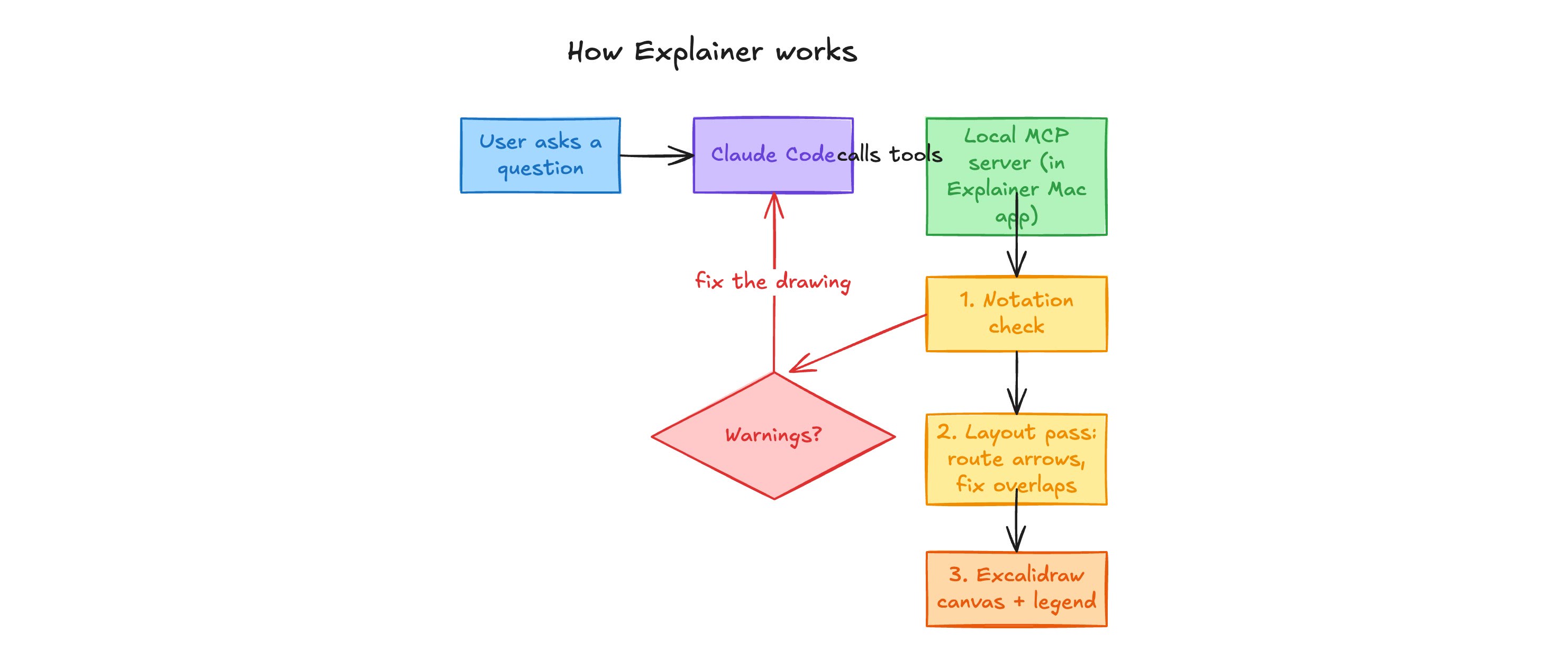
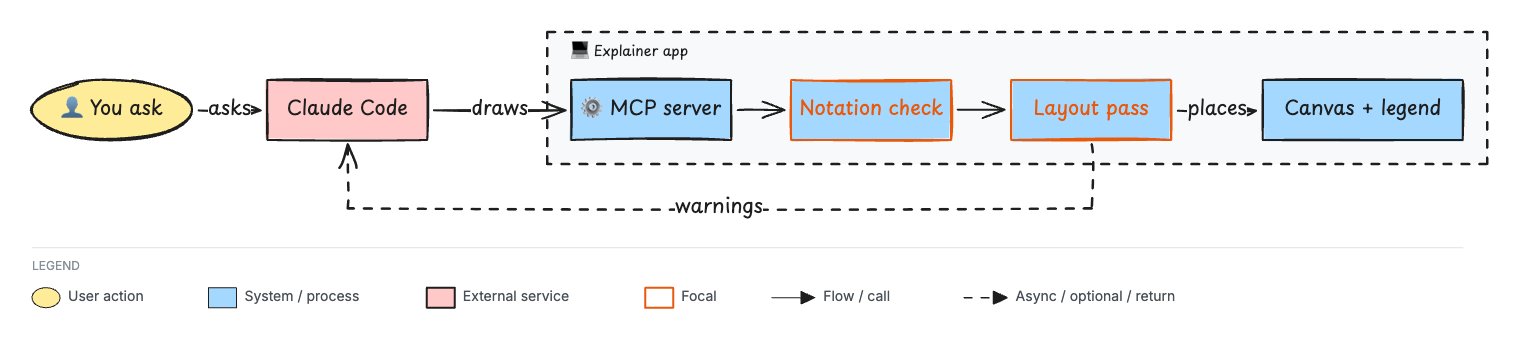
One shape per meaning
A yellow ellipse is always a user action. A blue box is always a system step. A green rounded box is always storage, and a red box is always an outside service. A reader learns this once and then reads every diagram faster.
The diagram rules (which type to draw and how to lay it out) are ported from Cathryn Lavery's open-source diagram-design skill and rewritten for the Excalidraw canvas.
The agent gets the notation in the MCP initialize reply, so every client receives it without setup. Claude Code cuts these instructions at 2,048 characters without a warning, so a test keeps them under that limit. The app also checks every batch against the notation and answers with exact warnings:
"warnings": [
  "diamond d1: a decision label ends with \"?\"",
  "rectangle db: a database label starts with \"DB: \"",
  "arrow a6 crosses rectangle mcp",
  "text \"warnings\" overlaps rectangle check"
]
A layout pass that fixes overlaps
Agents are bad at coordinates, so the agent never has the last word on position. The layout pass routes arrows with right angles, makes room for arrow labels, parks notes beside their elements and reports the overlaps that are left.
This part was the hardest. In the first weeks, 15 of the first 21 commits to the canvas code were layout fixes, and I checked each one with a 25-minute agent run and a screenshot review. So I moved the layout into one module and tested it with 17 real agent batches, one for each diagram type. The tests replay them in the running app, so the text sizes are real.
An automatic legend
The agent never draws a legend. The app reads the kinds that a diagram uses and adds a legend strip under the frame. The legend is always correct, and the agent spends no tokens on it.
Why I removed the in-app agent
The first version had a chat sidebar that ran the Claude Code CLI inside the app. I removed it after four weeks. By then the MCP server carried all the rules, so a second agent inside the app was too much. People already have their own agent. They connect it to Explainer and just use the app. The rules live in the server, so the diagrams stay the same, whichever agent draws them.
Results
- I use Explainer every day, mainly to understand new codebases and to learn new topics.
- 17 of 17 diagram types pass the layout tests: 0 warnings, every element inside the frame, and a legend. The full run takes about 0.1 seconds, where one check took 25 minutes before.
- 99 commits and 10 architecture decision records in ten weeks.
What I learned
A prompt cannot fix layout. Rules in text helped the agent pick the right shapes. They did not stop the overlaps. When the same mistake comes back after every prompt change, the fix belongs in code.
Feedback is better than instructions. The agent ignores a rule sometimes, but it fixes a precise warning almost every time.
The cover found three bugs. While I made the cover for this page, the app drew an elbowed arrow between two boxes on one row through the boxes between them, it did not join an arrow with an exact position to its frame, and it did not move the legend down for an arrow under the boxes. I fixed all three and added a layout test for each, so the suite now has 20 diagrams.
Try it
Explainer is open source under the MIT license. Build the app from the GitHub repo, open it, and connect Claude Code:
claude mcp add --transport http explainer http://127.0.0.1:7331/mcp --scope userThen ask Claude how something works.
 Insights dashboard
 Atlas design system
 Paylane checkout