2026
todoit: a Linear alternative built for AI agents
todoit is an issue tracker for AI agents and people. I plan my work in it, I track my time in it, and I send invoices from it. When I build with Claude Code, the agent connects over MCP and writes its own progress into the issues. I built it alone, as a free Linear alternative for my own freelance work.
Why I built todoit
I needed one tool for tasks, time and invoices. The trackers that I knew had tasks and time, but invoices were a paid add-on or a second app. Most of them were a monthly subscription. For one freelancer with a few clients, that cost was too high for what I used.
So I built my own. Then I saw a second problem. More and more of my work happened inside an agent session. The agent did the work, but the tracker did not know. I updated the issues by hand at the end of the day, from memory.
The fix: let the agent update the tracker itself.
What I built: your own Linear, with invoices
todoit is a fast, keyboard-first web app. Issues have a status, a priority, labels, sub-issues and a log of every change. You see them on a board, in a list or on a timeline. C opens a new issue and ⌘K opens the command palette, so you rarely need the mouse.
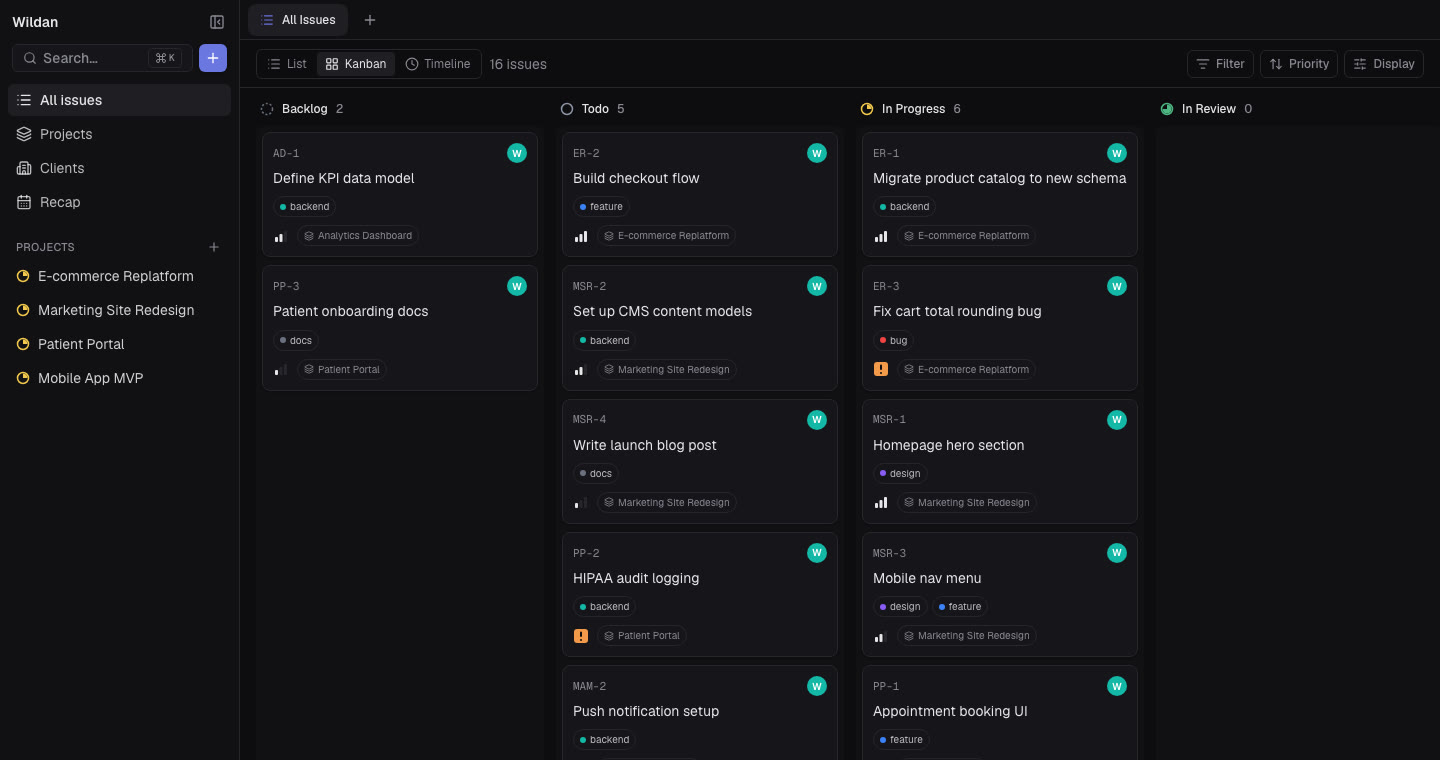
Projects hold their issues, links, files and notes. Clients hold their projects and their hourly rate. Every extra part (clients, time, invoices, recap, notes, sharing, MCP) is a feature toggle, so a user who only wants issues sees only issues.
From tracked time to an invoice
Time tracking starts by itself. When an issue moves to In Progress, a timer starts. When it moves to Done, the timer stops. I can still edit or add intervals by hand.
The client's hourly rate turns that time into money. At the end of the month, I open the client and make a new invoice. The draft pulls in the tracked time as lines. I check it, finalize it, and mark it paid when the money comes in. The recap shows the closed issues and the hours for any date range.
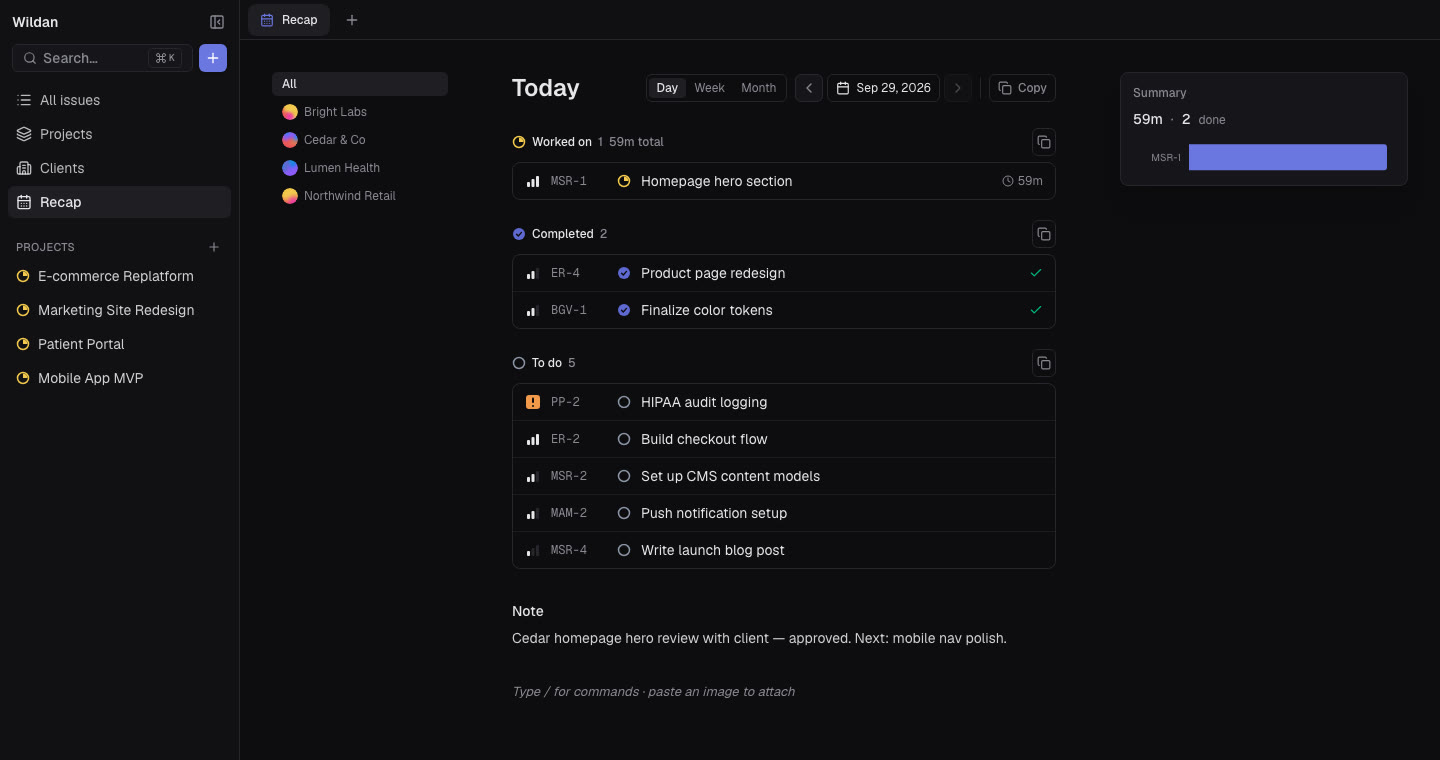
The agent writes its own progress (an MCP issue tracker)
todoit has an MCP server with 32 tools. An agent such as Claude Code can read the context, create and update issues, log time, write daily notes and run a recap. It is the same work that I do in the browser.
A normal session looks like this. I give Claude an issue. It reads the issue, moves it to In Progress, does the work, writes what it changed into the description, and moves it to Done. The timer runs the whole time.
update_issue({
  issue: "TOD-93",
  status: "Done",
  description: "Split the 3 biggest files. Tests pass."
})
Each connector gets only the tools it needs
An agent connects with a token that I make in Settings. Each token has its own set of permissions, and the server shows the agent only the tools that the token allows. A read-only token cannot change anything.
Money stays in human hands
The agent can read invoices, but it cannot make, change or finalize them. Those tools do not exist on purpose. An agent can make a wrong task, and I fix it in a second. A wrong invoice goes to a client.
Live sync: watch the agent work
The first version asked the server for new data every 20 seconds. The changes that an agent made showed up late, so it was hard to follow the agent while it worked.
Now a database trigger sends a small message on each change. The message holds only the table, the action and the row ID, never the row data. The browser gets the message and loads the fresh data through the normal API. Changes show almost at once, and no private data goes over the socket. The 20-second check stays as a fallback for a lost connection.
Code that agents can change safely
Agents wrote much of todoit's code, so the code has to be easy for an agent to change without breaking something. Each part of the domain (issues, time, clients, invoices) has the same layers: a route calls a service, the service calls use cases, and the use cases call a repository. I learned this shape, called domain-driven design (DDD), while I built todoit.
The safety net is the tests. About 570 tests run on every change, plus a screenshot suite of 38 screens in light and dark mode, on desktop and phone. When a change must not change the look, the screenshots prove it.
Results
- I use todoit for my own projects, time and invoices, with no subscription.
- 32 MCP tools. A runbook test runs every tool from an agent while I watch the browser update.
- About 570 tests, 38 screenshot tests and 40 database migrations, all checked in CI on every change.
- 288 commits from July to October 2026.
What I learned
Give the agent less than the UI. Every tool that I gave to the agent, I asked "what if it does this wrong?". The answer decided the permission: tasks yes, money no.
Send IDs, not data. A live message that only says "this row changed" is small and safe. The browser loads the data the normal way, so live sync and a page refresh use the same code.
Structure is for agents too. Before todoit, I did not know DDD existed. With the same layers in every part, an agent finds the right file the first time, and the tests show me when it did not.
 Insights dashboard
 Atlas design system
 Paylane checkout